BlurHash and CSS transitions for image loading
On Find a Cocktail every cocktail has a photo. The list loads fast, the images do not: for a moment the page is a grid of empty grey boxes, and then the pictures pop in one by one.
The usual fix is a thumbnail, but that is one more request per image. BlurHash avoids it: you encode the image once into a short string, around 30 characters, and send it in the same JSON that already carries the image URL. No extra round trip.
The backend does it at upload time: decode the uploaded image, encode the hash with a small component count (4x3 is enough), and store it in the same row as the image. The API just returns one more field.
The client turns that string back into pixels and paints them on a canvas:
import { decode } from "blurhash";

const pixels = decode(hash, 32, 32);

const canvas = document.createElement("canvas");
canvas.width = 32;
canvas.height = 32;

const ctx = canvas.getContext("2d");
const imageData = ctx.createImageData(32, 32);
imageData.data.set(pixels);
ctx.putImageData(imageData, 0, 0);
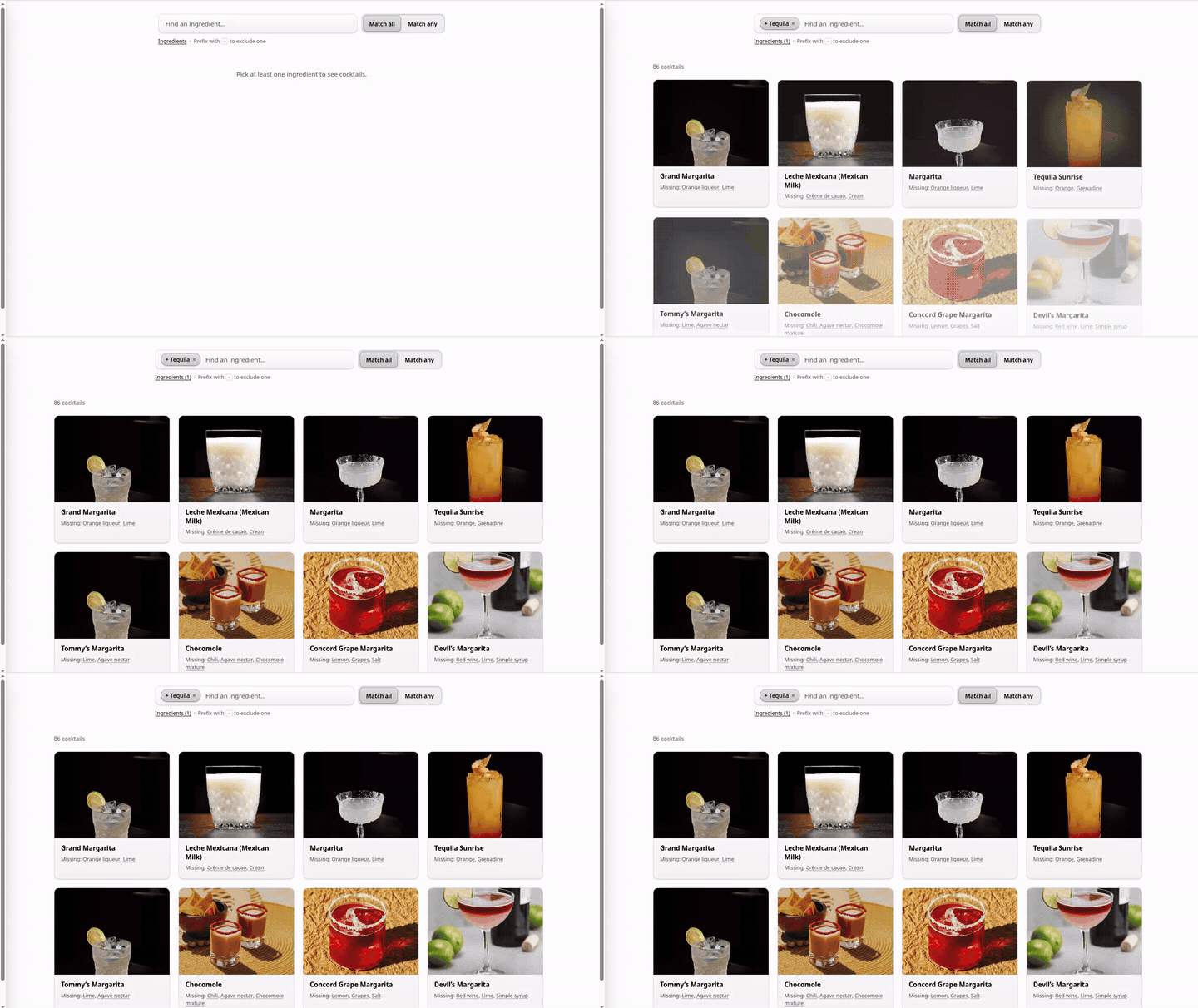
32x32 is enough: the browser scales it up and the result is blurred anyway. The canvas sits behind the real image, which starts at opacity: 0 and transitions to 1 on its load event. No empty boxes, no pop.
Slowed down, it looks like this: